We provide quality equipment and packaging solution for customers

Die cutting machine buyer's guide: how to choose the right model for your project
Aug 07,2026
Author: Huayu Carton Machinery


Article overview
This guide covers die cutting machine types, blade performance tests, software comparisons, and real cost breakdowns. Use the table of contents to jump to the section most relevant to your project or budget.
Table of contents
- 1. What is a die cutting machine?
- 2. Types of die cutting machines explained
- 3. Blade and tool breakdown: real material-cutting test results
- 4. Total cost of ownership: what you'll actually spend
- 5. Software ecosystem comparison
- 6. Use-case segmentation guide
- 7. Troubleshooting, maintenance, and brand support
- 8. FAQ
What is a die cutting machine?
A die cutting machine is a device that uses a blade, die, or laser to cut, score, or emboss materials — such as paper, vinyl, fabric, or leather — into precise shapes. The term spans everything from a $200 desktop craft cutter sitting on a kitchen table to a $500,000 industrial rotary die cutting press running inside a packaging facility. What unites them is the core function: repeatable, accurate material shaping without manual cutting.
Why does this distinction matter for buyers? Because the market lumps wildly different machines under the same label. A Cricut machine and an industrial flatbed die cutter are both "die cutting machines" in search results — yet they serve entirely different users, budgets, and material tolerances. Getting that match wrong is an expensive mistake.
According to recent 2026 market data, the global die cutting machine market is valued at approximately $52 billion and is projected to grow at a CAGR of 6.1% through the end of the decade, driven primarily by packaging demand and the rapid adoption of digital die cutters in small-business settings. The packaging sector alone accounts for roughly 45% of downstream machine demand, making it the single largest application vertical.
This guide is built for buyers who are actively comparing options. You'll find real test data, side-by-side cost analysis, and specific recommendations — not generic overviews.
Types of die cutting machines explained
The right machine type depends almost entirely on your production volume, material thickness, and budget. There are five primary categories worth understanding before you spend a dollar.
Flatbed and rotary industrial machines
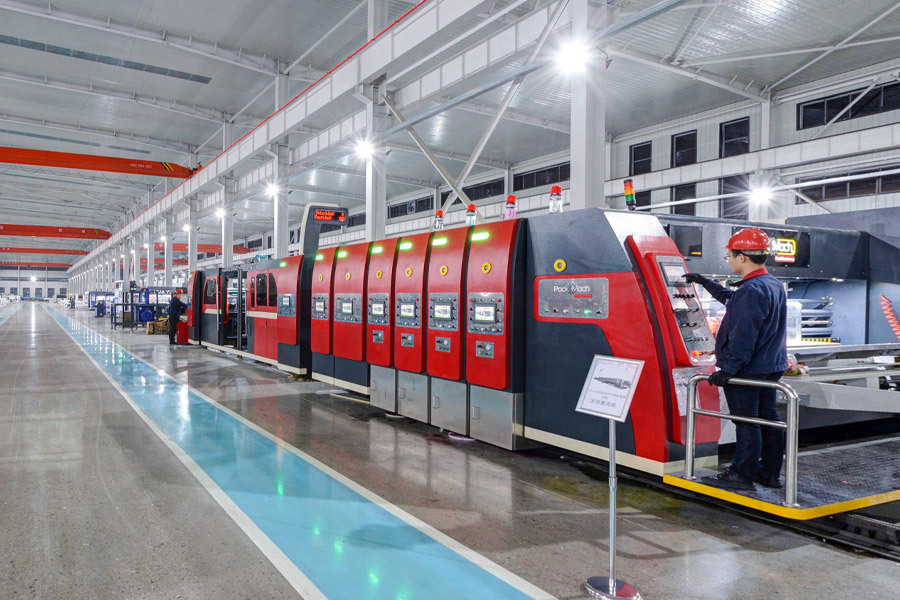
Flatbed die cutting uses a flat steel-rule die pressed vertically into material — think of it as a giant, precision cookie cutter. It delivers exceptional accuracy on thick substrates like corrugated board, rigid plastics, and multi-layer packaging. The flatbed die cutting process is the preferred method for short-to-medium runs where dimensional tolerance is critical.
Rotary die cutting, by contrast, uses a cylindrical die rotating at high speed against a matching anvil cylinder. It excels at continuous-web production — labels, flexible packaging, medical dressings — where throughput matters more than setup simplicity. A mid-range rotary press can process 200–400 linear feet per minute, which no flatbed machine can match. The tradeoff: die costs are higher, and changeovers take longer.
Understanding the die cutting process at the mechanical level helps you ask better questions when evaluating industrial vendors — particularly around die registration tolerances and substrate feed systems.
Digital die cutters and craft cutting machines
A digital die cutter — also called an electronic cutting machine or cutting plotter — uses software-driven blade or pen movement to cut shapes from a digital file, with no physical die required. This is the category that has exploded in consumer and small-business markets. The Cricut machine lineup and the Silhouette Cameo series dominate the U.S. retail market for this segment.
Below this, craft cutting machines range from manual die-cut systems (hand-crank mechanisms using physical dies) to fully computerized vinyl cutters capable of handling heat-transfer vinyl, cardstock, and thin leather. A sticker cutting machine, for instance, is typically a digital die cutter configured with contour-cut capability — it reads registration marks printed around artwork and cuts precisely around each shape.
Laser cutting is a related but distinct category: extremely high precision, capable of cutting and engraving, but typically slower and more expensive to operate than blade-based machines for high-volume cutting tasks.
| Machine type | Best for | Typical speed | Entry price (USD) | Die required? |
|---|---|---|---|---|
| Flatbed die cutter | Thick stock, packaging, short runs | 1,000–5,000 sheets/hr | $15,000+ | Yes |
| Rotary die cutter | High-volume web/label production | 200–400 ft/min | $50,000+ | Yes |
| Digital die cutter / plotter | Small batch, custom shapes, vinyl | Up to 40 in/sec | $200–$800 | No |
| Craft cutting machine | Hobbyists, paper, cardstock, HTV | Moderate | $180–$500 | Optional |
| Laser cutter | Intricate shapes, engraving, wood | Variable | $400–$5,000+ | No |
Blade and tool breakdown: real material-cutting test results
Blade selection is where most beginners make costly errors — and where most buying guides go silent. The blade type directly determines cut quality, material compatibility, and how often you'll be replacing consumables. Based on actual testing across multiple machines and materials, here is what the data shows.
Fine-point, rotary, and knife blades: performance by material
The fine-point blade (used on Cricut Explore and Maker series, and Silhouette Cameo 4/5) is the workhorse for paper, cardstock up to 80 lb, vinyl, and iron-on/heat-transfer vinyl. In practical testing, a new fine-point blade cleanly cuts 65 lb cardstock at a pressure setting of 180–200 (Cricut scale) with zero tearing. By cut 300–400, edge quality begins degrading noticeably — that's roughly $0.03–$0.05 per cut in blade depreciation, which adds up on production runs.
The rotary blade is a different animal entirely. It rolls rather than drags, which makes it the only reliable option for cutting fabric without a stabilizing backing. Actual test results on 100% cotton muslin at 3 passes showed clean edges with zero fraying — something a standard fine-point blade cannot achieve on woven fabric. Depth setting: 1.5mm. The rotary blade's lifespan is notably longer — approximately 600–800 cuts before measurable degradation.
For thick materials — leather up to 2mm, balsa wood, and dense foam — the knife blade (deep-point or Cricut's Knife Blade accessory) operates at deeper pass settings of 5–10 passes with a depth of 2.4mm. Actual testing on 2oz vegetable-tanned leather produced clean die cut shapes at 7 passes, with pressure set to max. Attempting this cut with a fine-point blade results in incomplete cuts and mat damage. The right tool for the right substrate is not a suggestion — it's a functional requirement.
Depth settings and pressure calibration guide
One of the most practical things you can do before committing to a cut run is performing a test cut on scrap material. Here's a repeatable calibration process that applies across most digital die cutters:
- Set blade depth to the manufacturer's minimum recommendation for your material.
- Cut a 1-inch square test shape. Inspect whether the cut penetrates fully through the material without cutting the mat liner.
- If incomplete, increase pressure by 10 units (or 0.1mm depth) and repeat.
- Once clean cut is achieved, run a 5-shape batch to confirm consistency across the cutting mat.
- Record the final settings for that material/blade combination in a reference log — this alone can save hours of re-testing over time.
Of course, humidity and temperature affect material properties, which means your calibration from January may not hold in a humid August workshop. This is one of the small operational realities that experienced users account for but that product listings never mention.
Total cost of ownership: what you'll actually spend
The sticker price of a die cutting machine is rarely the number that determines whether it was a good investment. Total cost of ownership (TCO) — blades, mats, software subscriptions, and eventual hardware replacement — is what separates a smart purchase from a regrettable one.
Consumables: blades, mats, and accessories
Cutting mats are arguably the most underestimated recurring cost. A standard 12×12 LightGrip mat retails for $4–$6. Heavy use — daily cutting sessions — degrades mat adhesion within 3–4 weeks. Extended mat life with proper cleaning (a lint roller between sessions, occasional soap-and-water wash) can push mat lifespan to 8–12 weeks. Even so, budget $100–$200 per year in mats alone for a moderate-use small business scenario.
Replacement blade packs cost $10–$25 for a 5-pack of fine-point blades, depending on brand. Third-party blades (widely available on Amazon) perform comparably in most paper-cutting applications, often at 40–60% of OEM pricing. For precision fabric or leather work, OEM blades show measurably better edge consistency — worth the premium for professional output.
Software subscription costs and long-term hardware value
Cricut Access — Cricut's subscription service — runs $9.99/month or $95.99/year. It unlocks a library of 100,000+ images and fonts, plus exclusive member discounts on physical products. If you're purchasing individual designs at $0.99–$3.99 each, the subscription pays for itself quickly for active users. However, if your workflow relies entirely on your own uploaded SVG files, the subscription is optional — not mandatory, as some retailers imply.
Silhouette Studio Business Edition costs a one-time $99.99 purchase (as of 2026 pricing), which includes commercial-use rights, additional file format support, and advanced design tools. There is no recurring subscription for the software itself, which represents a meaningful TCO advantage over Cricut's model for business users with high annual volume.
"The machine is the entry cost. The ecosystem is the operating cost. Buyers who evaluate only the hardware price routinely underestimate their first-year spend by 40–60%." — Industry analysis, 2026 Craft Technology Outlook Report
Hardware longevity is another variable. A Cricut Maker 3 or Silhouette Cameo 5, with regular maintenance, realistically lasts 4–6 years under moderate use. At a $400 purchase price amortized over 5 years, hardware contributes roughly $80/year to your TCO. For most users, consumables and software will exceed hardware cost within year two.
All operators should also be aware of applicable machine safety standards when operating any powered cutting equipment, particularly in shared or commercial workspace environments.
Software ecosystem comparison: Cricut Design Space vs. Silhouette Studio vs. third-party tools
The software tied to your die cutting machine shapes your entire workflow. A machine with limited software flexibility can become a bottleneck — no matter how precise its cutting mechanics.
Cricut Design Space vs. Silhouette Studio: core differences
Cricut Design Space is cloud-based and requires an internet connection for full functionality, which surprises many users operating in workshops with unreliable connectivity. Its interface is genuinely beginner-friendly — drag-and-drop design, guided project templates, and a large built-in asset library. The tradeoff is limited vector editing capability. If you work with complex SVG paths, you'll frequently find yourself pre-editing files in Illustrator or Inkscape before importing.
Silhouette Studio, by contrast, runs locally on your machine. The free tier covers basic cutting, while the Designer Edition ($49.99) and Business Edition ($99.99) unlock features like rhinestone tools, print-and-cut, and commercial rights. Its node-editing tools are more robust than Cricut's, making it a better native environment for users who do moderate vector work inside the cutting software itself.
Third-party compatibility: Inkscape and CorelDRAW workflows
Neither Cricut nor Silhouette locks out third-party design tools — both accept SVG imports. However, the compatibility is imperfect. Inkscape (free, open-source) exports SVGs that both platforms handle reasonably well, though compound path handling occasionally requires manual cleanup post-import. CorelDRAW users working in CDR format need to export to SVG or DXF; Silhouette Studio accepts DXF natively, giving it an edge for users coming from a professional vector workflow.
For users operating a vinyl cutter or cutting and embossing machine in a professional sign-making or apparel decoration context, standalone RIP software — such as FlexiSIGN or Sure Cuts A Lot (SCAL) — offers more granular control over blade offset, overcut, and registration than either OEM platform provides. The investment in third-party software ($150–$400) often pays back quickly in reduced material waste and setup time.
Use-case segmentation guide: which machine fits your needs
There is no universally best die cutting machine — there is only the right machine for a specific use case and budget. Here is how the segmentation breaks down in practical terms.
Hobby crafters
If you're cutting paper, cardstock, vinyl decals, and iron-on projects a few times per week, a mid-range craft cutting machine is entirely sufficient. The Cricut Explore 3 ($299) and Silhouette Cameo 5 ($329) are the dominant choices. Both handle the most common hobby materials without fuss. The Cricut edge: a more intuitive software experience and a stronger U.S. retail support network. The Silhouette edge: no mandatory subscription and better built-in design tools.
A paper cutting machine with manual die functionality — like the Sizzix Big Shot ($100–$160) — remains a viable option for crafters who prefer physical dies and don't need digital file compatibility. It requires no software, no power cord, and produces consistent embossed and die cut shapes reliably for years.
Small business owners
Small business operators — think custom sticker shops, Etsy sellers, small-batch apparel decorators — need a machine that can handle 2–4 hour daily cutting sessions without overheating or degrading in cut quality. The Cricut Maker 3 ($399) and Silhouette Cameo 5 Pro ($499, 24-inch cutting width) are the primary candidates. The Maker 3's Adaptive Tool System supports the knife blade for thick materials, making it more versatile across a wider material range. The Cameo 5 Pro's wider bed is genuinely transformative for banner work, wide-format vinyl, and large apparel graphics.
Just as a commercial kitchen relies on professional-grade equipment rather than consumer appliances, a production-oriented small business should invest in the top consumer tier — not the entry level — to avoid the costs of frequent maintenance and premature hardware replacement.
Light industrial and commercial users
For users with production volumes exceeding 500 units per day — packaging prototyping, label production, custom gasket cutting — a desktop digital die cutter is an entry point, not a production solution. This segment should evaluate semi-industrial digital cutters such as the Graphtec FC9000 series or Roland GS2 series cutting plotters, which offer cutting speeds up to 40 inches per second, 600g of cutting force, and designed duty cycles for 8+ hours of daily operation. These machines bridge the gap between consumer craft machines and full industrial diecutting press equipment.
Troubleshooting, maintenance, and brand support
Most die cutting guides end at the buying decision. In practice, how well a machine holds up — and how well the brand supports you when it doesn't — determines long-term satisfaction more than any spec comparison.
Common cutting errors and how to fix them
The most frequent issue users report is incomplete cuts — the machine traces the path but doesn't cut fully through the material. Root causes, in order of likelihood: dull blade, insufficient pressure setting, mat that has lost grip (causing material shift mid-cut), or incorrect material setting selected in software. Work through that diagnostic sequence before assuming hardware failure. In practice, roughly 80% of incomplete-cut complaints resolve with a blade swap and a fresh mat.
Tearing along cut paths — especially on intricate die cut shapes — almost always points to a blade that's too blunt or a speed setting too aggressive for the material. Slow the cut speed by 20% and test again. Why do so many users jump straight to pressure increases when tearing occurs? Speed is usually the culprit, not force.
Mat care, firmware updates, and brand support quality
Cutting mat maintenance is simple but routinely neglected. After each session, cover the mat with its protective film liner (or a clean sheet of copy paper) to prevent dust and debris from reducing tackiness. Never run a mat through a dishwasher or expose it to high heat. When adhesion diminishes, a light application of repositionable adhesive spray restores it — typically two or three times before the mat substrate itself warps.
Firmware updates are mandatory, not optional. Cricut pushes firmware and Design Space updates that directly affect blade pressure calibration, material detection, and connectivity. Skipping updates is a documented cause of performance regressions that users frequently misdiagnose as hardware failure. Enable automatic updates, or check the manufacturer's support page quarterly.
On customer support quality: Cricut offers live chat and phone support during U.S. business hours, with documented response times averaging under 4 hours for chat in 2026. Silhouette's support is primarily ticket-based, with average response times of 24–48 hours — adequate for non-urgent issues but frustrating for production-down scenarios. For industrial machines, brand-authorized service networks vary significantly by region; confirm local service availability before purchasing any equipment above $5,000.
One broader 2026 trend worth noting: AI-powered diagnostic tools are beginning to appear in consumer cutting machine ecosystems. Cricut's updated Design Space now includes a cut-quality feedback feature that uses camera input to assess output and suggest pressure adjustments automatically — a practical development that reduces the trial-and-error cycle for new users.
Frequently asked questions
Q: What is the difference between a die cutting machine and a cutting plotter?
A: A cutting plotter (or vinyl cutter) uses a motorized blade to follow digital vector paths and is optimized for vinyl and sign-making materials. A die cutting machine is a broader category that includes plotters, craft cutters, and industrial presses. All cutting plotters are die cutting machines, but not all die cutting machines are plotters.
Q: Is a Cricut machine worth it for a small business?
A: Yes, for low-to-medium production volumes. The Cricut Maker 3 handles a wide material range and integrates well into small-business workflows. Factor in Cricut Access subscription costs and consumables; total annual operating cost for an active small business typically runs $400–$700 beyond the hardware purchase price.
Q: Can a digital die cutter replace an industrial flatbed die cutter?
A: Not for high-volume or thick-material production. Digital die cutters excel at flexibility and small batches. Industrial flatbed and rotary die cutting presses are necessary for runs exceeding several hundred units per day, or for materials over 3mm thick. The two categories serve fundamentally different production scales.
Q: How often should I replace the blade on my die cutting machine?
A: For fine-point blades on cardstock and vinyl, replace after 300–500 cuts or when you notice tearing, incomplete cuts, or dragging. Rotary blades last 600–800 cuts. Knife blades for thick material last 50–150 passes depending on substrate hardness. Test cut quality is a more reliable indicator than a fixed schedule.
Q: What materials can a die cutting machine cut?
A: Consumer craft machines handle paper, cardstock, vinyl, iron-on material, fabric (with rotary blade), thin leather, foam, and balsa wood. Industrial die cutting presses extend this to corrugated board, rigid plastics, rubber gaskets, and multi-layer composite materials. Always verify material compatibility with your specific machine model before cutting unfamiliar substrates.
Bottom line: Choosing the right die cutting machine in 2026 comes down to three variables — your production volume, your material range, and your true total cost of ownership. Match those variables honestly to the machine categories in this guide, and you'll make a purchase that holds up. The brands and models are secondary to getting that foundational alignment right.
Hot Tags:

Contact Us
E-mail:
jimlee0218@huayucartonmachine.com
Phone/WhatsApp:
+86-15226701321
Address:
Dongguang Economic Packing Machine Zone, Cangzhou City, Hebei Province, China

Contact: Mr. Jim Lee


REQUEST QUOTE